Seamless live event translation & captions made easy. [Watch 3-Min Demo]
Extend Videos To a Global Audience
Wordly AI video translation helps you scale multilingual communication. Translate spoken content into accurate subtitles or captions in dozens of languages with fast turnaround and custom glossary support. Ideal for webinars, e-learning, and product videos.
.avif)
.avif)
If you are like most companies, you have created a large library of videos from in-person events, webinars, training sessions, product demos, and a wide range of other meetings and events.
In most cases, the videos are in a single language which limits their use with a global audience of customers, partners, and employees.
Now there is a fast, high quality, affordable solution to the single language video problem.
Wordly has powered live translation for millions of users at meetings and events worldwide. Our AI-powered platform has been optimized with hundreds of millions of translation minutes to deliver high quality captions in dozens of languages.
The Wordly translation platform can also be used to provide video translation - enabling you to extend the use of your video library to a global audience.
Customers send Wordly their video files along with the list of translation languages.
Wordly will process the videos, provide AI transcription of the audio, and send customers the updated subtitle files in the requested languages - in either SRT or WebVTT format.
Clients can translate into the following languages:
Arabic, Bahasa (Indonesian), Bengali, Chinese (Simplified & Traditional), Czech, Dutch, English, French, German, Hebrew, Hindi, Italian, Japanese, Korean, Polish, Portuguese, Romanian, Russian, Spanish, Swedish, Tagalog, Tamil, Thai, and Vietnamese.
Clients can translate from the following languages:
Bengali, Chinese (Simplified & Traditional), Dutch, English, French, German, Hindi, Italian, Japanese, Korean, Portuguese, Russian, and Spanish.
Clients can provide custom glossaries to capture their organizational jargon and industry specific terminology.
Standard turnaround time is one business day, but we can complete the project sooner upon request.
Pricing is based on the number of videos and the number of languages.
Wordly can also provide live translation and captions for in-person, virtual, and hybrid meetings and events. Key features of Wordly include:
What is Video Translation?
Video translation refers to the process of translating audio and visual content in a video from one language into another — often supported by tools like AI captioning to make content more accessible. Video translation can be performed by an AI video translation solution or a team of translators, editors, and voice-over artists who work together to create a translated version of the video.
Video translation is used in a wide range of applications, including film and television, educational content, and promotional materials. It is an important tool for breaking down language barriers and making video content more accessible and inclusive for a global audience.
Video translation typically involves several steps, including transcribing the audio content, translating the text into the target language, adapting the visual content to match the translated text, and recording a voice-over in the target language. The final product is a translated video that accurately conveys the meaning and tone of the original content, while maintaining the visual appeal and style of the original video.
Wordly provides a wide range of personalized and online assistance to get you up and running quickly.
One frequent question customers ask is: Can you add captions to videos with Wordly? Wordly enables you to add captions and subtitles to videos in all supported Wordly languages. This is in addition to supporting live events.
See more frequently asked questions here.
More Resources - For additional AI translation and captioning resources, visit All Resources.
Wordly offers a range of features enabling you to provide video translation after all your meetings.
One key feature is:
Translated Transcripts
Full session transcripts, translated into dozens of languages, are available after every live translation session. The meeting host decides who has access to the transcripts.
See all Video Translation features.
Wordly provides a wide range of personalized and online assistance to get you up and running quickly.
One frequent question is:
Can you add captions to videos with Wordly?
Wordly enables you to add captions and subtitles to videos in all supported Wordly languages. This is in addition to supporting live events.
See more questions.
Customers love Wordly for our fast set up, ease of use, extensive features, and affordable pricing.
One happy customer said:
“I really enjoy how user-friendly the software is. The Zoom plugin was key for me since I often have to not only facilitate, but manage the chat and interact with the attendees at the same time.”
See what Customers are saying.
.avif)
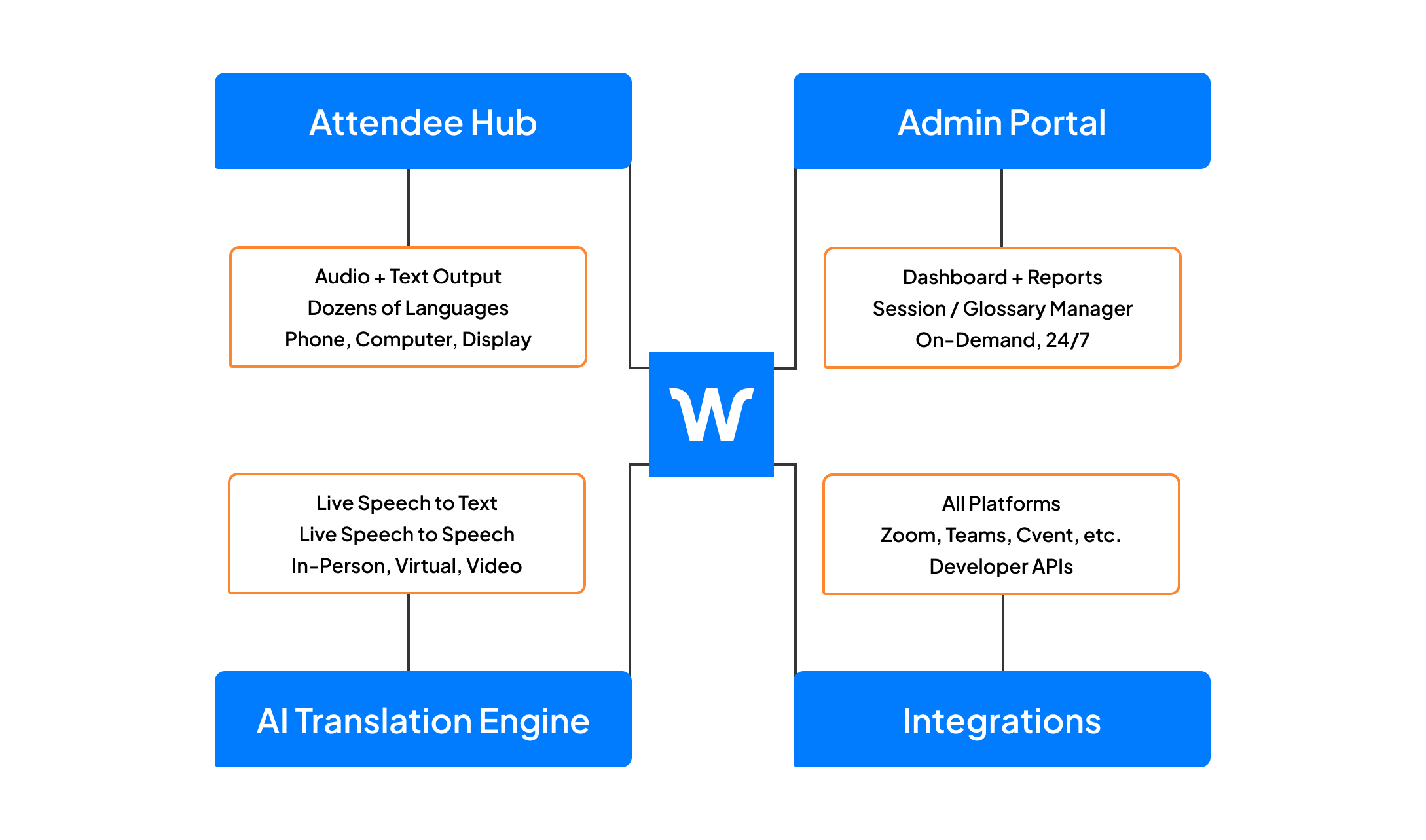
Video Translation is part of the Wordly Platform which includes live translation and captions, along with post-event text transcripts, voice transcripts, and summaries. Use the text transcript files to create captions and subtitles for videos - and the voice transcript files to dub videos. Use the summaries for post-event content sharing and marketing programs. The Wordly Platform provides a comprehensive all-in-one AI-powered solution to meet language access needs across your organization.
.png)
.png)
%20(1)%201.png)
.png)
In a 30-minute video call, we will show you how Wordly can work for your use case, and answer questions.
.png)